


Indaconn Hub: many machines, one language for SCADA and PLCs
The Indaconn Edge module that collects data over MQTT, OPC-UA and MTConnect, makes it uniform and exposes it to SCADA and PLCs over OPC-UA and Modbus, with replay to Indaconn Cloud.
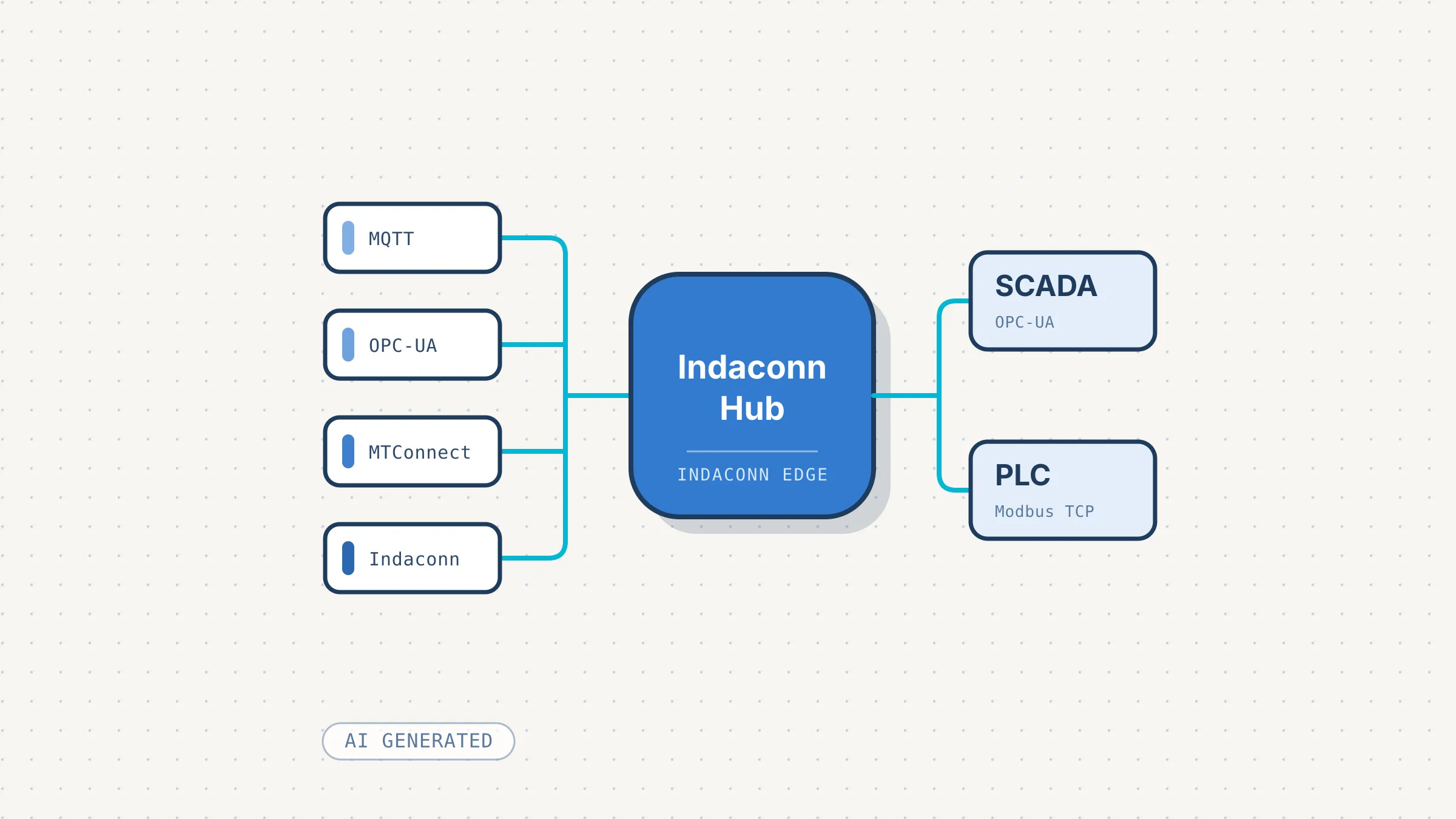
Almost every plant we walk into shows the same scene. A line of machines from different eras and different vendors: the newest one publishes its data as JSON to an MQTT broker, the one from a few years back has an onboard OPC-UA server that accepts two or three sessions in total, the machining center speaks MTConnect. On the other side there is a SCADA that would like to read everything from a single place, and maybe a PLC that only communicates over Modbus. Every connection turns into a small project of its own, with its own script, its own format and its own way of breaking without telling anyone.
Indaconn Hub is the software module for Indaconn Edge that we built to untangle this mess. It collects data from several machines over several protocols, brings it into a single model and exposes it again over OPC-UA and Modbus TCP. Through OPC-UA it also works the other way round: from the internal network you set the value of a variable and the module takes it to the machine. And when needed, with message replay, the same data also reaches our Indaconn cloud platform. In this article I explain why it was born, how it is used and what role it plays inside the Indaconn platform, where it does much more than convert one protocol into another.
The problem is not the protocol
Translating MQTT into OPC-UA, on its own, is a simple task: the libraries exist and they work. The real work is everything around it.
- Every machine names things its own way. One counter is called
mot1Seconds, sits three levels deep in a JSON document and counts seconds; another is an OPC-UA node with an identifier nobody on the shop floor can read. - A number on its own does not tell you whether it is still good. When the machine switches off, the last value stays there. The SCADA reading it draws a flat line and records it as valid data.
- Configuration changes. One more variable, a renamed topic, a new machine on the line. If every change means stopping the gateway, sooner or later nobody makes changes anymore.
- Plant data is sensitive. Not everyone wants it to go through the internet to reach a SCADA ten meters away.
Indaconn Hub is built around these four points, more than around the protocols.
Where it sits in the Indaconn platform
Indaconn is our IIoT platform: machines connect securely, with certificates signed by the platform, and their data reaches the cloud. Indaconn Edge is the device that lives in the plant, an industrial gateway on Linux-based hardware; we already met it as the bridge between field data and the cloud in the article about VigilHub.
Indaconn Hub is a module installed on the Edge and it works entirely on site: it connects to the machines on the plant network and serves SCADA, MES and PLCs on the same network. Machine values do not travel through the cloud to reach the SCADA, and they are not stored: the module keeps only its own configuration. History stays with whoever is responsible for managing it, namely the SCADA or the MES. The cloud only comes into play when you ask for it, with message replay (more on this below).
machines (MQTT, OPC-UA, MTConnect, Indaconn)
        ▲
        │
        ▼
Indaconn Hub on Indaconn Edge
collection → single model → transformations
        │
        ├◀─▶ OPC-UA server    (SCADA, MES: read and write)
        ├──▶ Modbus TCP slave (PLCs, operator panels)
        └──▶ optional replay to the Indaconn cloud platform
From the machine to the SCADA, in four steps
Everything is configured from a web interface served by the module itself, in Italian and English, with users and roles.
1. The machine and its data sources
You create a machine and attach one or more data sources to it: an MQTT broker, an OPC-UA server, an MTConnect agent. Each type of source has its own configuration form, which checks the fields before saving: a wrong value is flagged right away, instead of surfacing later in the logs. A button also lets you try the connection before saving, to find out whether the source really responds.
An MQTT source, for example, is described like this:
{
  "broker": { "host": "10.0.0.9", "protocol": "mqtt", "username": "op", "password": "..." },
  "topics": [
    { "filter": "plant/press01/+", "qos": 0, "format": "json", "timestampPointer": "/payload/time", "timestampUnit": "s" }
  ],
  "liveness": { "topic": "plant/press01/status", "onlinePayload": "online", "offlinePayload": "offline" }
}
The + wildcard covers all the topics the machine publishes under plant/press01/, with a single source. timestampPointer tells the module where to find the machine’s clock inside the message, so every value carries the moment the machine measured it rather than the moment it reached the gateway. The liveness section tells the module how the machine announces it is on or off.
For OPC-UA there is no need to copy node identifiers by hand: you browse the machine’s address space and tick the nodes to subscribe to. Many onboard OPC-UA servers accept very few concurrent sessions, and the interface reminds you of that when you add the source, because the gateway opens one of its own.
2. Observed addresses
This is one of my favorite parts. Once the source is on, the module watches what comes in and lists every value it has seen, with a readable path like press01.temp instead of the technical pointer. You do not need to know the message format by heart or dig through the vendor’s documentation: you pick what you need from the list and bind it to a variable, with a name, a type and a unit of measure.
Variables belong to the machine, not to the source. If tomorrow the same data comes from another source, you just rebind the variable and everything downstream (the OPC-UA node, the Modbus register) stays where it was, so the SCADA keeps its subscriptions.
3. Transformations, with a preview
Raw data is rarely what the SCADA needs. Each variable can carry a chain of transformations: type conversion, scale and offset, unit conversion, limits, rounding, deadband, text turned into booleans, codes turned into named states, string formatting.
For the cases where a linear scale is not enough there is the formula. Flow derived from a differential pressure, for example, is a square root: $sqrt($x) * 12.5, where $x is the incoming value. The formula can only work on that value and use a limited list of functions. If it contains an error, the module rejects it on save and you fix it right away, instead of finding out later through an error on every incoming reading.
While you build the chain, the live preview shows step by step what each transformation does to the latest value received from the machine, without saving anything. You see right away if the scale factor is off by a thousand, before the shift supervisor does.
4. Exposure: OPC-UA and Modbus
On the other side, the module offers two outputs.
The OPC-UA server presents two trees. The first mirrors the plant: machines, sources and variables, with diagnostic nodes telling you whether each source is connected and when it last spoke. The second is built by the operator with the plant’s own names: folders like Line1/Oven, nodes with an identifier of their choosing, each bound to any variable of any machine. This way you can hide thousands of variables and name the twenty that matter.
The OPC-UA server is not only for reading. A variable can be made writable: a client on the internal network (the SCADA, a MES, a panel) sets the node’s value and the module takes it to the machine through its data source, in the protocol the machine understands. A set point changed in the SCADA reaches the machine without a dedicated connection, and the node stays the same one the SCADA reads from.
The Modbus TCP slave is a single one for the whole gateway and answers on a different unit id for each machine. The register map is shown on a single page, so the integrator configuring the master looks at the same table the gateway serves.
From the interface you can turn the two exposures on or off, change their port and set the OPC-UA credential. Changes are applied instantly, without restarting the module, and the same goes for a new machine or variable: it shows up in the SCADA without interrupting anything.
Data quality is data
This is what most sets Indaconn Hub apart from a plain protocol converter. Every value travels with its quality: good, stale, source disconnected, value the machine itself declares invalid, transformation error, and so on.
Quality does not stay locked inside the gateway. In OPC-UA it becomes the node’s StatusCode, which every SCADA understands. In Modbus, where the protocol has nothing of the kind, you can dedicate a register to quality next to the value’s register.
Two details that look small and are not:
- Every value carries the machine’s timestamp, even when it stops arriving. If a stalled value were relabeled with the time it was re-read, any system that logs data over time would store it as an up-to-date measurement, and the chart would show a flat line with nobody noticing. Here the value stays stamped with the time the machine produced it: the SCADA sees that it has stalled, and since when.
- Source health is explicit, not an inference. “The connection to the machine dropped” and “the component reading it stopped” are two distinct events, reported by whoever observes them, not inferred from the absence of incoming data.
Indaconn machines, even without internet
For machines designed to connect to the Indaconn platform, the module goes one step further. Normally these machines connect to the broker directly in the cloud. With Indaconn Hub they can connect instead to a broker running on the Edge, inside the module, with the same rules as the cloud: only clients presenting valid credentials can connect, and their identity is derived from them.
What changes in practice:
- Data stays in the plant. From the machine to the SCADA, the whole path is on the local network.
- Provisioning works without internet. A new machine connects with default credentials and receives dedicated credentials from the module: no cloud required.
- Replay to the cloud is a choice. A single switch, for the whole module, enables message replay to the Indaconn cloud platform. When it is on, the module opens one session per machine towards the cloud, on behalf of the machine, and the platform sees it as if it were connected directly. When it is off, data does not leave the plant.
- Nothing goes unnoticed. A machine with a valid certificate that has not been configured yet gets in, but is not forwarded to the cloud and does not receive provisioning; Indaconn lists it with its identifier, ready to be added.
Replay is there precisely to cover two opposite needs with the same module. Some companies do not want their data to leave the plant: they keep replay off and the plant runs on its own, without depending on the internet. Others want to use the Indaconn platform from the cloud: they turn replay on and the machines show up on the platform as if they were connected directly. Either way the machines connect to the Edge and the SCADA keeps working locally, so you can change your mind later without touching the machines.
For a company with security requirements to meet, or that simply does not want the line to depend on an external connection, the question is no longer whether to trust the cloud, but what to decide to send there.
Built to live in a plant
A gateway is something nobody wants to have to think about. Some design choices exist precisely for that.
A failure stays where it starts. Each data source is read in its own thread. If reading a machine hangs or fails, the module restarts it on its own, without involving the rest. The same goes for the Indaconn broker. This separation keeps the main thread free, the one that talks to the Edge and keeps SCADA sessions alive: even with many sources at work, OPC-UA, Modbus and the interface always stay responsive.
It recovers on its own. If the broker or the machine’s server goes down, the connector keeps retrying and, when the source comes back, values resume without anyone stepping in.
It is closed even if nobody configures it. A freshly installed device refuses anonymous OPC-UA sessions: whoever reads the plant must present a credential. Anonymous sessions can be enabled again, but it has to be a conscious choice. The interface has two roles, administrator and user, and only an administrator can open or change the ports towards the plant network.
It writes only when you decide. Writing is off by default and is enabled variable by variable: a node nobody made writable rejects every attempt, and writing requires an authenticated session. A gateway that can set values on a machine has to be cautious by construction, so that a configuration mistake in the SCADA does not turn into an unexpected command on the line.
What it does not do, and why
A few limits, for completeness:
- It is not a SCADA and keeps no history. It stores configuration, not values. Time series belong where the tools to handle them are.
- Not everything can be written. MTConnect is a read-only protocol, so machines connected that way can only be read; for the others, only the variables someone has enabled can be written.
- Renaming a hand-built OPC-UA node has a cost. The identifier is the node, so changing it means creating a new one, and a client pointing to the old one stops finding it. Better to know it up front than to find out from a SCADA that can no longer find the node.
- Sessions to a machine’s OPC-UA server count. The gateway takes one, and on servers that allow only a few you have to plan for it when other clients read the same machine.
In short
Indaconn Hub takes the work that is usually redone for every plant (reading different machines, naming the data, converting it, exposing it) and turns it into configuration. For whoever runs the plant, it means adding a machine without opening a separate integration project. For the integrator, it means a SCADA reading clean OPC-UA and Modbus, with the quality of every value, and able to set values on the machines from the same OPC-UA server. For anyone using the Indaconn platform, it means machines that keep working when the internet is down and that can communicate with the cloud without being directly exposed: security is concentrated on a single device, the Edge, instead of being spread across machines that were not designed for connectivity and may even be obsolete. Replay to the cloud stays a choice, to be turned on or left off depending on what is needed.
If you have a line of machines speaking different protocols and a SCADA that would like to read just one, get in touch: we would be glad to talk about it.